

作者:Ashley Peele
也许 Atlas 志愿者会问自己应该将他们的繁殖数据提交到哪里?简而言之,如果您的清单上有任何繁殖代码,那么应该将其提交至 Atlas eBird 门户网站https://ebird.org/atlasva/home 。
对于那些喜欢通过智能手机输入 eBird 列表的观察者来说,重要的是要知道需要采取一次性步骤来确保您的 Atlas 清单最终出现在 VABBA 2 eBird 门户中。现在可以通过切换门户,使用智能手机直接向 Atlas eBird 门户报告观察结果。下图说明了如何在智能手机上更改 eBird 门户。

在您的智能手机上切换门户 - ( 1 ) 单击“设置”图标 ( 2 ) 轻触门户按钮 ( 3 ) 选择首选门户,可以是“常规” eBird(如图所示)或向下滚动到 VA Breeding Bird Atlas 门户。
如果您需要通过计算机更改门户,请按照下图所示的步骤操作。请记住,您可以随时返回并更改清单的详细信息,尤其是已提交到的门户!
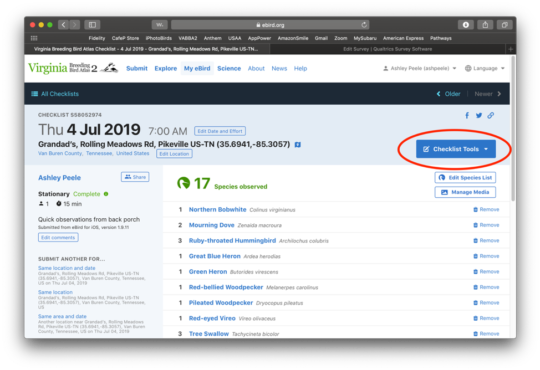
第一步:打开感兴趣的相关清单,找到清单工具按钮(下图红色圈出)
第二步: 点击“检查清单工具”(Checklist Tools)按钮,并从下拉菜单中选择 更改门户 (如下方红圈所示)。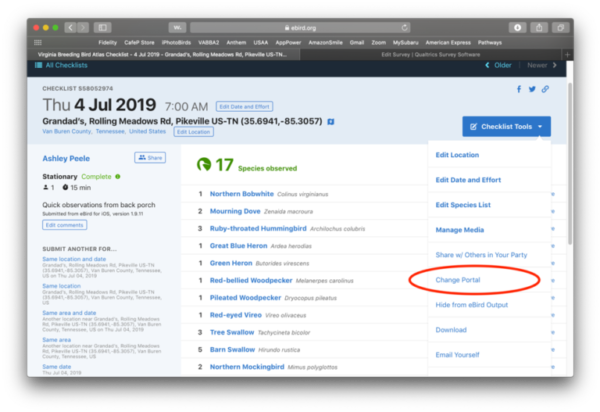
第三步:新屏幕将出现另一个下拉菜单。 点击右边的箭头(在下方圈出),然后向下滚动到门户列表的底部,在那里你会看到列出的 “Virginia Breeding Bird Atlas”。选择此项,点击绿色的 "更改门户 "按钮就可以了!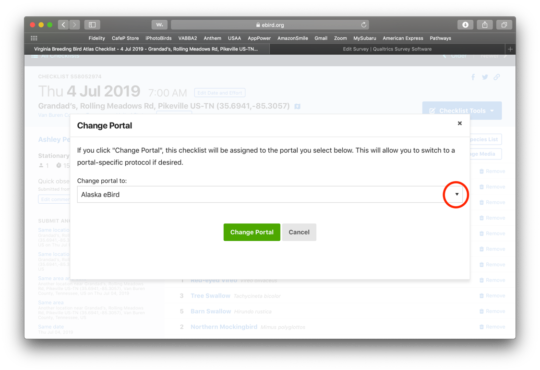
请记住在夏末繁殖观察逐渐减少时将您的门户设置切换回常规 eBird。重要的是防止与繁殖无关的数据填满 Atlas 数据库,因此到八月时请考虑切换。您可以随时切换回 VABBA 2门户,进行奇怪的晚期繁殖观察。
~ Ashley Peele,VABBA 2州协调员